Most signal workflows point outward: prospects, target accounts, competitors. But some of the most valuable public activity comes from people who already pay you. A champion comments on a competitor's launch thread. An exec sponsor posts that the team is "rethinking our stack". A VP announces they are hiring a second team that will need your product. By the time any of this shows up in a QBR, it is old news.
We build MultiFollow, so here is the honest shape. MultiFollow is an anonymous Linkedin and X (Twitter) account activity watchlist. You add the people (and company pages) that matter, choose posts, comments, and (on Linkedin people) likes, and we alert you by email, Slack, or API webhook when those accounts move. This post is the customer success and account management version of that workflow. It is not a health score, and it does not replace product usage data. It adds the public, human side of the account to what you already see.
If you have not set up a watchlist before, start with How to bulk-import a Linkedin and X watchlist from CSV and come back.
Job to be done
Get alerted when a named contact at a customer account (champion, exec sponsor, admin, or economic buyer) publicly posts or comments about something that changes the account's outlook: evaluating alternatives, budget pressure, a reorg, a new team, a launch, or praise for your product. Then route that alert to the account owner fast enough to act before the renewal conversation.
Signals worth catching (and what to do with each)
| Signal type |
What it looks like in public |
Typical owner action |
| Churn risk |
Comment on a competitor's launch or pricing post. Post about "evaluating", "switching", "migrating", "RFP", or budget cuts. |
CSM checks usage and books a check-in before the renewal window. |
| Org change |
Post about a reorg, layoffs, a new leader, or "my last day". |
Map the new stakeholders, re-confirm the champion and sponsor. |
| Expansion |
Post about hiring, a new team, a new region, a funding round, or a product launch. |
AM opens an expansion conversation tied to the news. |
| Advocacy |
Post or comment that names your product positively. |
Ask for a review, a case study, a referral, or a quote. Say thanks in the thread. |
Be honest about the limits before you build on this:
- MultiFollow does not track job changes. A champion leaving is one of the strongest churn signals, and we will not flag a title change. You will only catch it if the person posts or comments about it (and your keywords match). If job-change tracking is the job, use a dedicated tool or your CRM enrichment for that part.
- Company pages are posts only. For comments and likes, you need Linkedin person trackers. Company and showcase trackers alert on official posts.
- X likes are not tracked. They have been private since 2024. On X we track posts and replies.
- Keywords filter text only. They apply to posts and comments. Likes have no text, so keywords cannot filter them.
- Public activity only, anonymously. We do not follow or connect on your behalf, and your customers are not notified. Use it to show up at the right moment with something useful, not to quote a stranger's comment back at them.
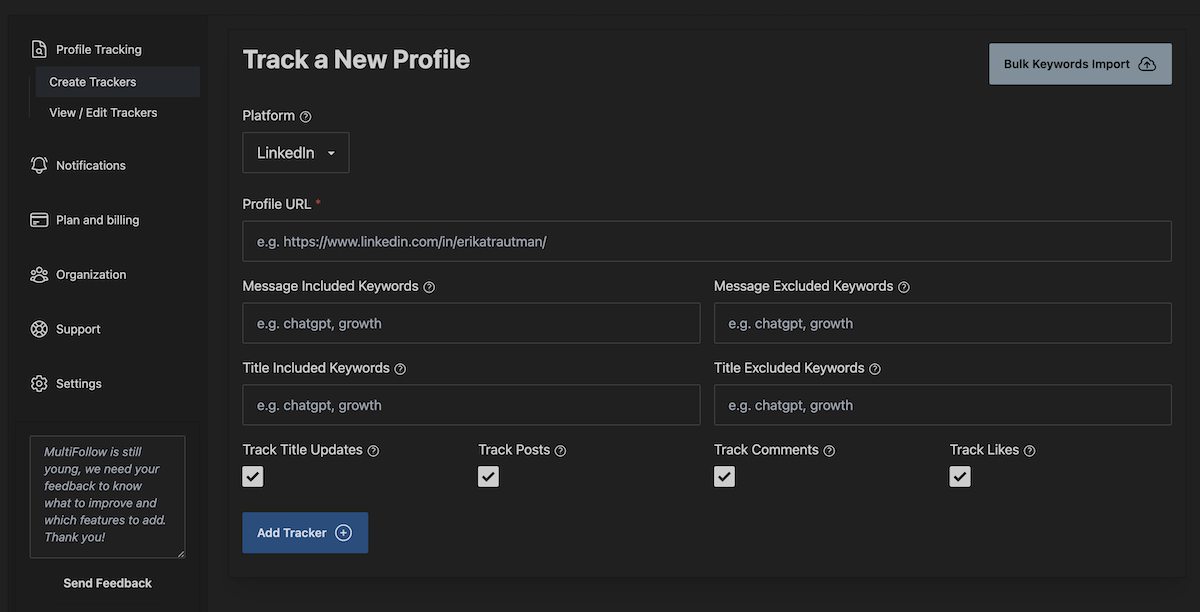
Field reference: Trackers docs.
Setup: a customer watchlist that the CS team will actually read
Step 1. Pick who to track (Linkedin trackers are the scarce resource)
You will not track every user at every account, and you should not. Prioritize:
- 1. Accounts by risk and value. Renewals in the next 90 to 120 days, your top accounts by revenue, and anything already flagged yellow or red.
- 2. People by influence. Per account, the champion and the exec sponsor first. Add the economic buyer or the main admin only if they are active on Linkedin.
- 3. The company page, optionally. One company tracker per key account catches official launches, funding news, and hiring announcements without spending a person slot on noise.
Plan sizing, using the live pricing on multifollow.io: Free covers 1 Linkedin + 2 X trackers (enough to pilot one champion). Essential covers 5 + 10. Business covers 25 + 50, which is roughly 10 to 12 key accounts with two people each. Enterprise covers 100 + 200. If your book is bigger than that, rotate: keep renewal-window accounts on the watchlist and swap them out after the renewal closes.
Step 2. Import from your CRM export
Pull a CSV from your CRM with the contact's Linkedin URL (and X URL if you have it), the account name, and the account owner. Linkedin person URLs must look like https://www.linkedin.com/in/{username}/, company pages like https://www.linkedin.com/company/{name}/, and X accounts like https://x.com/{username}.
Bulk CSV import is on Business and above. On Free and Essential, add trackers by hand in the dashboard. Format details and gotchas: How to bulk-import a Linkedin and X watchlist from CSV.
Step 3. Set activity flags per role
| Person |
Posts |
Comments |
Likes |
| Champion |
On |
On |
On only for your top accounts |
| Exec sponsor |
On |
On |
Off |
| Economic buyer or admin |
On |
On |
Off |
| Customer company page |
On |
N/A |
N/A |
Comments matter more than you might expect here. Customers rarely post "we are leaving our vendor". They do comment "we are looking at this too" under a competitor's launch post.
Likes are the noisiest signal. A champion liking a competitor's post is worth knowing about on a short list of strategic accounts, but it floods a channel fast on a big book. Start with likes off and turn them on per tracker once the comment feed is quiet enough to read.
Step 4. Add include and exclude keywords
Each tracker takes up to 10 included and 10 excluded keywords (comma-separated, 2 to 200 characters each). An alert fires when the post or comment contains one of the included keywords, and is suppressed when it contains an excluded one. Leave the include list empty if you want every post and comment from that person (still subject to excludes).
Because one tracker has one include list, pick the 10 terms that matter most for that account. A starting point to adapt:
- Include (churn plus expansion mix): your top competitor's name,
switching, migrating, evaluating, RFP, reorg, hiring, new team, raised, your own product name
- Exclude:
webinar, congrats, podcast, newsletter, giveaway
Adding your own product name to the include list is the cheap way to catch advocacy (and complaints) from people you already track. For exec sponsors who post rarely, consider leaving include empty so nothing slips through.
Deep dive on keyword logic and noise control: How to filter Linkedin and X watchlist alerts with keywords.
Step 5. Route each alert to the account owner
Where alerts land decides whether anyone acts on them.
- Email: every plan. Fine for a solo CSM pilot on Free or Essential.
- Slack: Business and above. Use an incoming webhook to a
#cs-signals channel. Each tracker can also have its own Slack webhook URL, so you can send strategic accounts to a separate channel or split by CS pod.
- API webhooks: Business and above. Every alert is sent as a JSON payload to the URL you choose, either account-wide or per tracker. Receive it in Zapier, n8n, Make, or your own endpoint.
A simple CRM pattern with n8n or Zapier:
- 1. Receive the MultiFollow webhook. Each alert includes the platform, the profile URL that triggered it, the date and time of the activity, the URL of the post, comment, or like, the text of the post or comment, and the activity type (new post, new comment, or new like).
- 2. Look up the contact in your CRM by Linkedin or X profile URL (this is why the CSV in Step 2 should come from your CRM).
- 3. Log the alert as a note or activity on the contact and its account, and create a task for the account owner if the text matched a churn keyword.
- 4. Optionally post a short summary to the owner's Slack channel with a link back to the original post.
Step-by-step routing walkthrough: Route MultiFollow alerts to Slack, Clay, n8n, or Zapier.
To share alerts across the CS team without forwarding emails, create a team and invite members (team management is on Business and above).
Step 6. Prove it with one real alert
- 1. Add one champion at a friendly account as a Linkedin person tracker: posts and comments on, likes off, include list empty.
- 2. Wait for a real post or comment and check that it lands where you expect (email, Slack, or your CRM note).
- 3. Then add keywords and roll out to the rest of the renewal-window accounts.
Refresh is per second. Notifications usually arrive within a couple of seconds, and up to about a minute during temporary congestion (best effort on Free).
What to do when an alert fires
MultiFollow is the trigger, not the playbook. Some habits that work:
- Churn-risk comment on a competitor thread: do not mention the comment. Check product usage, then reach out with something genuinely useful (a feature they are not using, a roadmap update on the gap they care about) and offer a call.
- Reorg or new leader post: ask your champion who you should brief, and send a short "what you get from us today" summary the new leader can read in two minutes.
- Hiring or new-team post: congratulate them in the thread, then open the expansion conversation with the account owner a few days later.
- Positive mention of your product: thank them publicly, then ask for a review or a case study while the goodwill is fresh.
A note on the sibling job
A watchlist only covers people you already know. Customers also complain, compare, and ask for alternatives from accounts you are not tracking, often on Reddit or in Linkedin and X posts that mention your brand. That is keyword listening, a different job. If you want that side too, our sibling product KWatch.io monitors keywords like your brand and competitor names across Linkedin, X, Facebook, Reddit, Youtube, and Hacker News.
Try it on one account this week
Pick the customer whose renewal worries you most, add their champion as a tracker, and watch what they say in public for a week. The Free plan covers 1 Linkedin and 2 X profiles and needs no card.
Start on the free plan, no credit card
Julien
Product Manager at MultiFollow
 MultiFollow.io